Choose which emails you get
The notification switches in Settings, and the emails that always come.
Open Settings, Notifications to choose which updates reach your inbox.
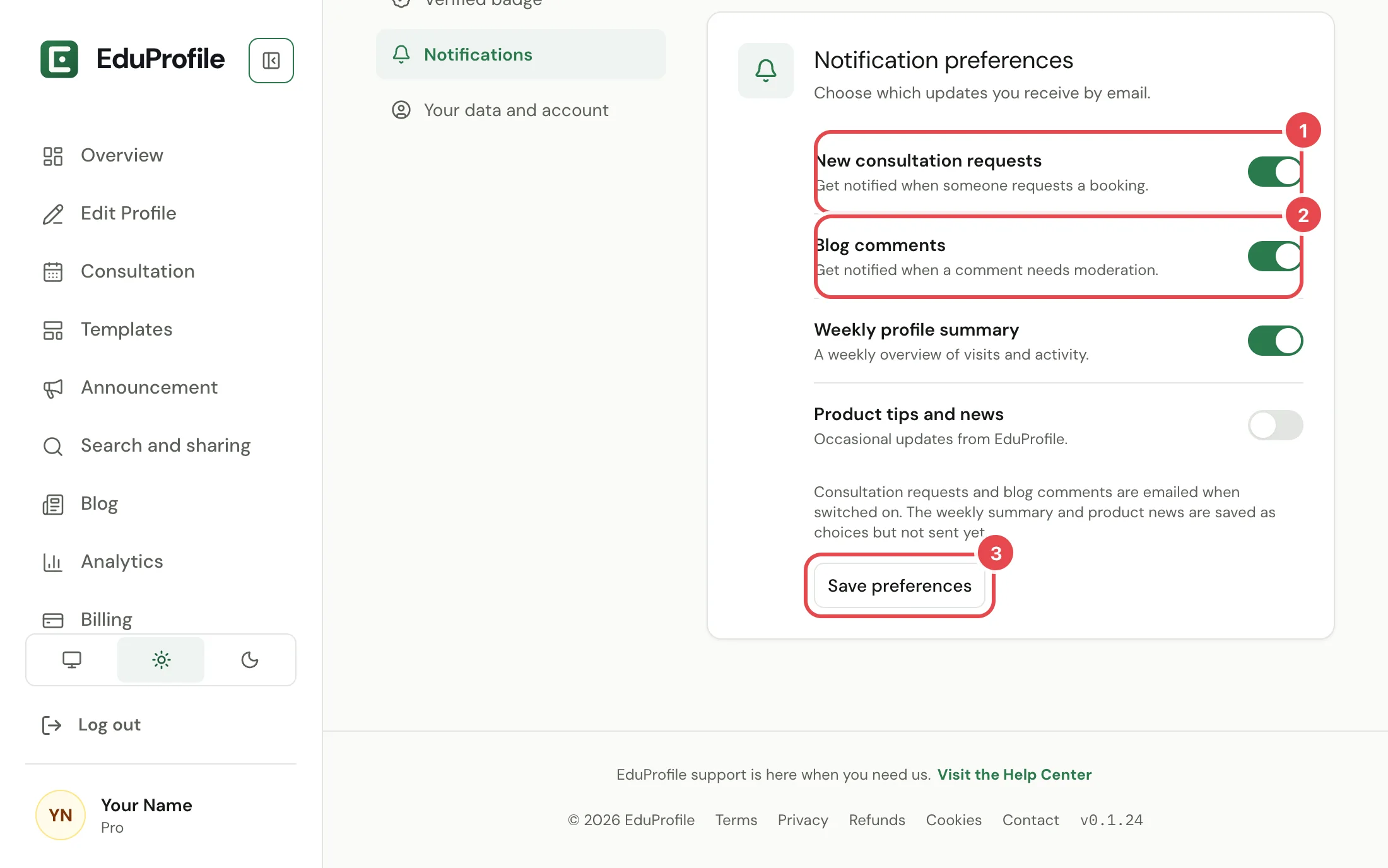
The switches
- New consultation requests. An email when a visitor asks for a consultation. It also covers the notice that a visitor cancelled, and the reminder before a confirmed consultation. See Consultation bookings.
- Blog comments. An email when a comment needs your review. See Moderate your blog comments.
- Weekly profile summary and Product tips and news. You can choose these today, and the choice is saved, but we do not send either one yet.
Press Save preferences after you change a switch. Nothing changes until you do.
Emails you cannot switch off
Some emails are part of running your account, so they always come:
- Verification codes and sign-in codes.
- Receipts, renewal reminders and payment problems. See Subscribe and pay.
- Notices that your plan, trial or domain is changing.
- Changes to your password, two-factor settings or passkeys.
- Changes to our terms.
Alerts about a sign-in from a new browser have their own setting, under Settings, Sign-in and security, Sign-in alerts. See Remember me.
We do not send advertising emails.
If an email does not arrive
Check your spam folder first, and make sure the address on your account is right under Settings, Sign-in and security. If it still does not arrive, write to us.
Still stuck? Contact us.