Education, career and affiliations
Add your degrees, the positions you have held and the bodies you belong to.
These sections tell visitors who you are professionally. Add them under Edit Profile.
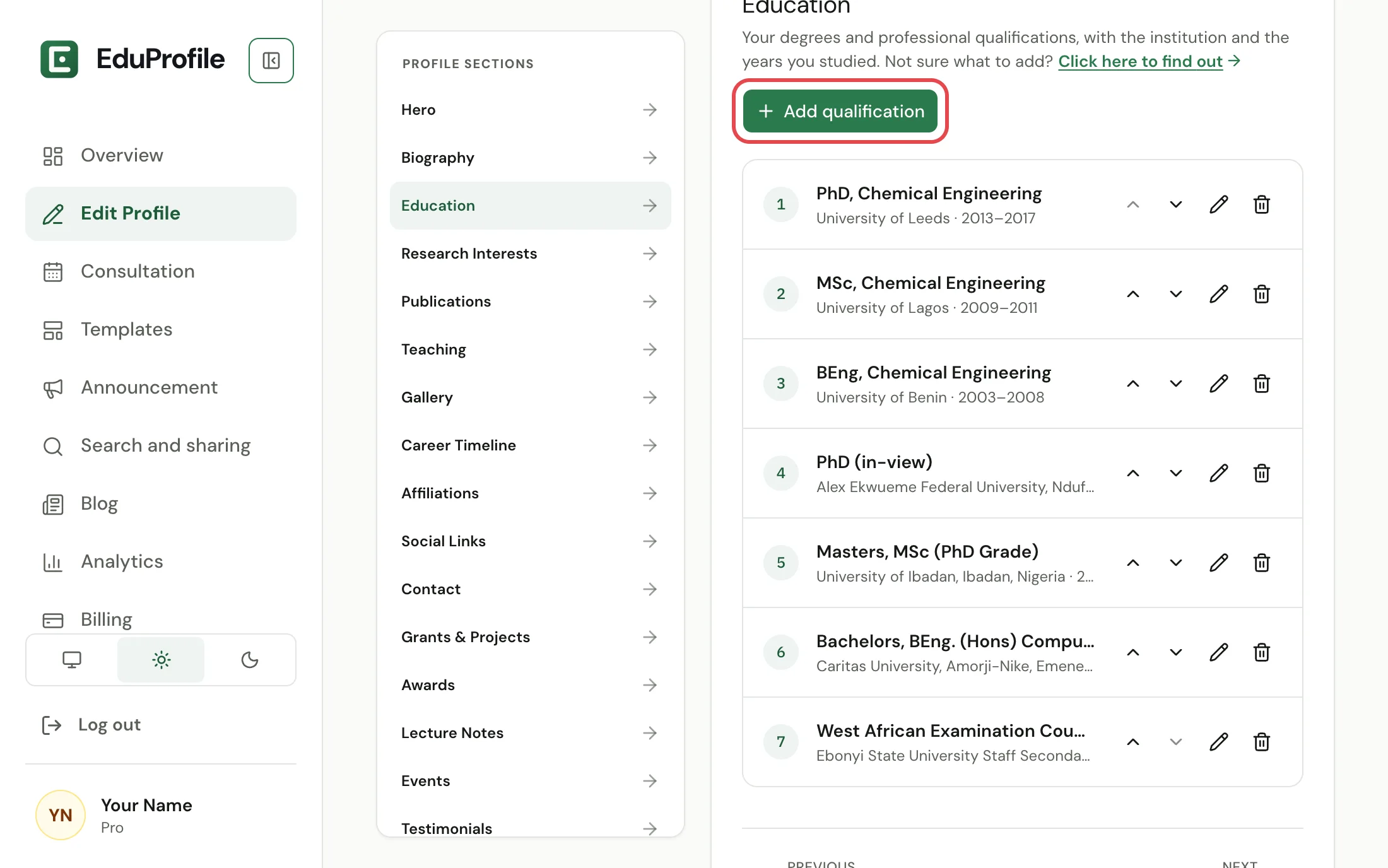
Education
Open Education and press Add qualification. Each one has a Degree (for example "PhD, Chemical Engineering"), an Institution, and an optional start and end year. The degree and institution are required.
Career Timeline
The positions you have held and your promotions. Each entry has a Position, an Institution and a From and To date. Leave To empty for a position you still hold, and it is shown as current. An end date cannot be before the start date.
Affiliations
Professional bodies, learned societies, fellowships, editorial boards and registrations. Each has the Organisation, a Role or membership type such as Fellow or Member, a from and to year, and an optional link. A blank To year means you are still a member.
Affiliations are part of the Standard plan and above. On Starter the section is shown with a plan badge, and opening it explains what it adds.
Good to know
- Use the arrows beside an entry to move it up or down. This is how you choose the order visitors see.
- The pencil edits an entry and the bin deletes it. Deleting asks you first.
- Every section has a Show … on my site switch if you want it hidden for now. See Show or hide a section.
- All three appear in your downloadable CV.
- A section with nothing in it is left out of your site automatically.
Still stuck? Contact us.